Simulated trades
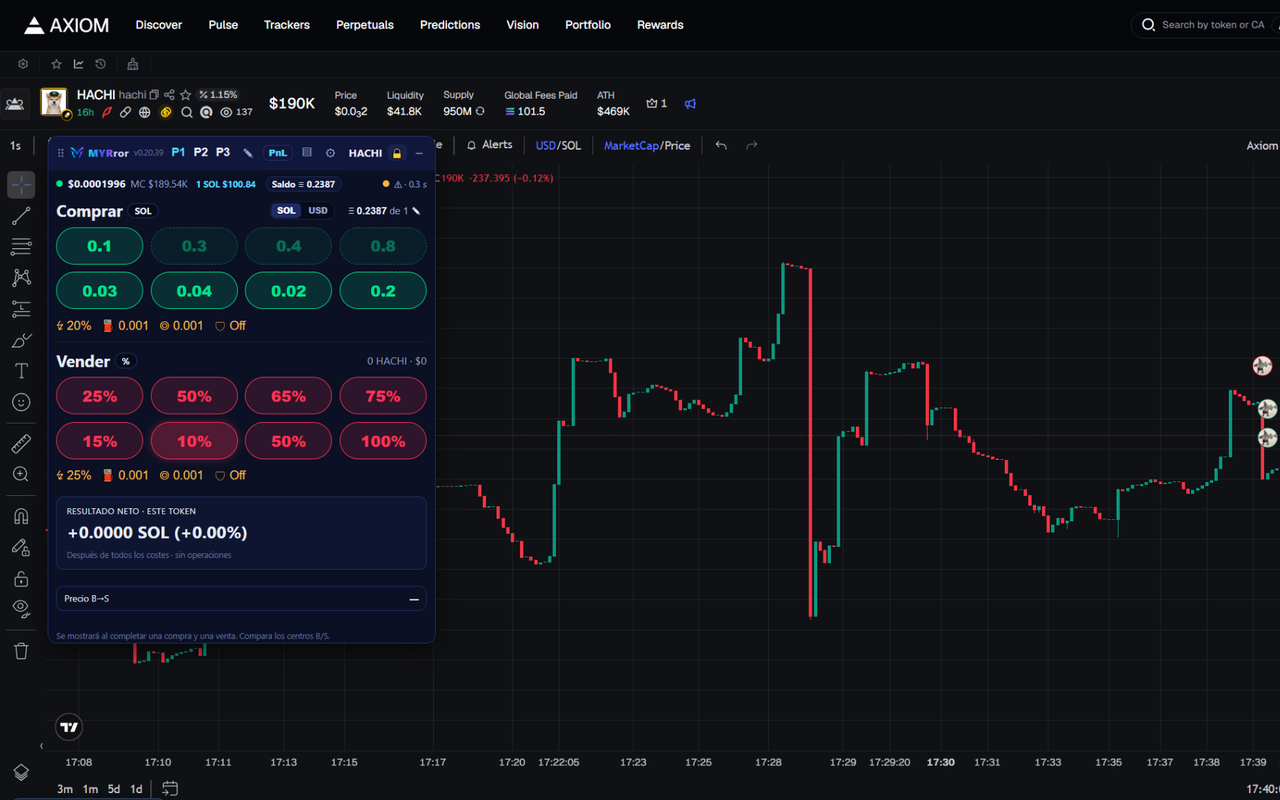
Configurable buy and sell buttons. Prices are calculated from public Solana market data and include slippage, simulated fees and price impact based on liquidity.
MYRror Trading Simulator adds a practice panel to Axiom's market charts. Simulated buys and sells, results after costs, trade history and progress, so you can train your execution before trading for real.
MYRror is not published on the Chrome Web Store yet. During the private beta it is installed manually in Chrome; the installation guide explains every step.
This is an educational simulator. MYRror does not execute real trades, does not accept deposits for investment, does not connect wallets and does not promise returns. Simulated results do not guarantee real results. MYRror is not affiliated with or endorsed by Axiom.
Learn how buys, sells, slippage and fees work without losing money while you make mistakes.
Rehearse entries and exits on real market charts, then review what you did and what it cost.
Every practice session starts with 1 simulated SOL. If it runs out, you can start over with a Rebirth and keep your history.
Here is clearly what works today and what is still being prepared.
MYRror is a Google Chrome extension. It is not on the Chrome Web Store yet: during the beta it is installed manually. Follow the installation guide.
Sign up in the extension or on this website’s Account page with a username and a password, or continue with Google when it is available. No wallet is connected.
Open a token on Axiom, use the MYRror panel to buy and sell, and review your net result after costs.
Features included in the current beta.
Configurable buy and sell buttons. Prices are calculated from public Solana market data and include slippage, simulated fees and price impact based on liquidity.
See the net result for each token after all simulated costs, plus your buy and sell markers on the chart.
Check your open positions, their estimated value and your practice balance in the Portfolio or the Positions bar.
Every buy and sell is recorded with its costs so you can review your decisions.
Unlock achievements for practice habits and progress through experience ranks. A rank does not certify profitability.
Start a new practice session with exactly 1 simulated SOL. Your history, achievements and MYRror Coins are kept.
PRO is a subscription in preparation: it has no final price and real payments are not enabled. Checkout is being tested in Stripe test mode (no real money) with authorized beta accounts. Both plans start every practice session with 1 simulated SOL and use the same pricing and result rules. PRO does not improve profitability or rank.
| Benefit | FREE | PRO (in preparation) |
|---|---|---|
| Practice time | 25 minutes per day (UTC). Test videos add up to 15 minutes each, with a maximum stored total of 180 minutes. | Unlimited |
| Balance at the start of each session | 1 simulated SOL | 1 simulated SOL |
| Rebirth without videos or waiting | Not included | 1 per day (UTC), does not accumulate |
| Regular Rebirths | 5 test videos per Rebirth and a 4-hour wait between Rebirths | Same rules, after using the daily Rebirth |
| Shorten the wait | Each test video reduces the current wait by up to 30 minutes | Same |
| Direct MYRror Coins | Not included | 5 MC every 8-hour block, no video |
| MYRror Coins from videos | Up to 5 videos per 8-hour block, 5 MC each | Same, in addition to the direct claim |
| Pricing and result rules | Same for everyone | Same for everyone |
| History and achievements after a Rebirth | Kept | Kept |
The current videos are test simulations within the beta. MYRror Coins are not cryptocurrencies or trading balance: they cannot be transferred or withdrawn and have no monetary value. See Subscriptions and cancellations for the status of PRO.
No. You start with 1 simulated SOL. MYRror does not accept deposits, does not connect wallets, never asks for private keys or seed phrases, and does not sign or send transactions to the blockchain.
MYRror estimates what would have happened using public market data, but a real trade can fill at a different price, with different latency or without enough liquidity. There are also no real-money emotions at stake. Use the results as training, not as a prediction.
The net result deducts simulated costs such as the platform fee, priority fee, tip, token account rent and slippage or price impact based on pool liquidity. They are educational estimates; nothing real is charged.
A username and a password. You can create them in the extension or on this website’s Account page, and you can also continue with Google when it is available (your Google email is then stored). The extension always uses your username and password to sign in. You can sign out and delete your account from the Arena section of the extension.
It means starting a new practice session with exactly 1 simulated SOL. You must first close your positions and cancel open orders. Your history, trades, achievements and MYRror Coins are kept. On FREE it requires 5 test videos and there is a 4-hour wait between Rebirths; PRO also includes one daily Rebirth with no videos and no wait.
Not with real money yet. PRO is in preparation and has no final price. During the beta, payments run only in Stripe test mode for authorized test accounts, and nothing real is charged. PRO is activated only when the MYRror server receives Stripe’s verified confirmation, and it applies to the same account in the extension and on this website. Before any real charge, we will publish the price, renewal and how to cancel on Subscriptions and cancellations.
Public leaderboards are disabled for now, until the server can verify results. You can check your own progress, achievements and practice rank.
Since version 0.20.41 the extension is available in English (default), Spanish, Brazilian Portuguese, Turkish, Simplified Chinese and Russian. Change it with the globe selector next to your avatar in MYRror Arena. BUY, SELL, PNL, SOL and token names and symbols are not translated.
No. MYRror is an independent project that runs over Axiom's charts in your browser. It is not affiliated with or endorsed by Axiom.
When MYRror is available on the Chrome Web Store, the official link will appear here. Until then, follow the installation guide.